A Manufacturer’s Guide for Designers, Agencies, and Retail Brands
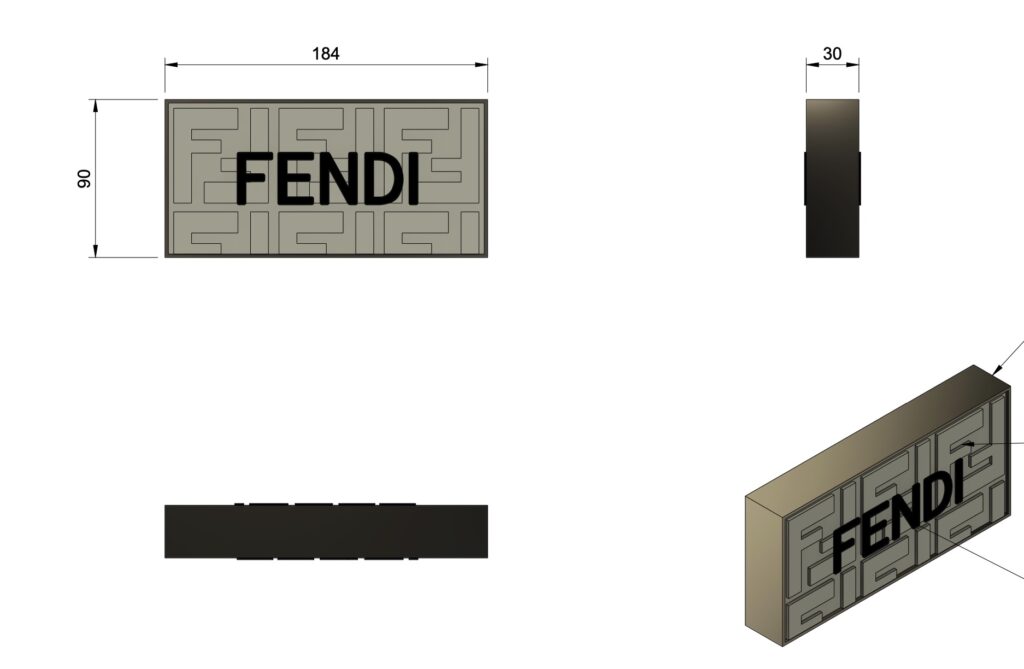
If you're looking for the right file formats for retail display engineering, Samtop supports most formats including .STEP, .DXF, .AI, and more — even hand sketches. From visuals to CNC-ready files, we bridge the gap for agencies, designers, and global brands.
Yes — Samtop accepts most 2D and 3D file types, including .STP, .DXF, .AI, .SKP, and even hand sketches. Whether you’re sending visual renders or engineering CAD, we’ll turn it into a production-ready retail display.
You’ve finished a design — now you’re ready to brief a factory. But you’re wondering:
“What file types do I need to send?”
“Is PDF enough?”
“Do I have to prepare CNC drawings too?”
Many manufacturers demand precise engineering files — but creative teams often don’t have them ready.
Result: frustrating back-and-forth, delayed samples, or even rejected production.
At Samtop, we bridge the gap.
Whether you send .STP, .SKP, .PDF, or even just a photo — we’ll interpret, convert, and engineer your display into a fully manufacturable solution.
✅ File Formats for Retail Display Engineering: What You Can Send
These file formats for retail display engineering allow us to streamline CNC, LED, and branding workflows.
| Format | Description | Preferred? |
|---|---|---|
.STP / .STEP | Universal 3D CAD format, CNC-ready | ✅ Best |
.IGS / .IGES | Geometry exchange, smooth curves | ✅ |
.DXF / .DWG | CNC laser cutting, panel layout | ✅ |
.AI / .EPS | Vector artwork for UV print, cutting, graphics | ✅ |
.PDF (with size) | Quoting, dieline reviews, basic artwork | ✅ Initial |
.3DM (Rhino) | Native for creative designers | ✅ |
.SKP (SketchUp) | Retail layout, concept visuals | ✅ |
.OBJ / .FBX | Render files, reference geometry | ⚠️ Visual only |
| Photos / Sketches | Moodboards, past samples, visual notes | ✅ We’ll reverse engineer |
📩 Not sure what you have? Send it anyway — we’ll advise in 24h.
🛠️ What Happens When You Send a File
At Samtop, we don’t just “cut what you give us.” We translate your design into production logic.
Here’s what we do internally:
- Import your files into SolidWorks, Rhino, or AutoCAD
- Add CNC paths, holes, LED channels, joinery logic
- Build assembly systems (magnet, screw, slot-in, etc.)
- Flatten 3D geometry into cutting files (.DXF, .DWG)
- Simulate flat-pack structure + box size
- Review for material compatibility & stress tolerance
🔄 Result: A full manufacturing tech pack — ready for QC, quoting, and sample approval.
🔍 File Requirements by Material or Process
| Material / Process | Required Format |
|---|---|
| Metal CNC (cut + bend) | .DXF + bend angles |
| Acrylic laser cutting | .AI / .DXF / .STP |
| Wood / MDF CNC routing | .DXF / .STEP |
| Fiberglass / Resin props | .STEP / .IGS + radii |
| Vacuum forming mold | .STP 3D geometry |
| Printing / branding graphics | .AI with outlines / CMYK |
| LED layout / wiring map | .DWG / .PDF + voltage |
🧪 Need help converting? We do it in-house — no need to outsource.
🧪 Case Study: From Sketch + PDF → CNC-Ready Display
Client: US-based design agency
Input: SketchUp file + annotated PDF
Display: PU-wrapped tray + LED acrylic + printed graphics
Problem: No engineering files, no cutting paths
Samtop Solution:
- Imported
.SKPand rebuilt in SolidWorks - Added LED slot + cable channel + modular fit
- Created
.DXFfiles for CNC routing & acrylic cutting - Packaged into gold sample with all parts labeled
✅ Delivered production files in 4 working days
✅ Quoting ready within 24h
✅ Final display shipped to 6 countries
🧰 Samtop's Engineering Stack
We use:
- SolidWorks — 3D manufacturing logic
- AutoCAD — CNC panel nesting & tolerance spec
- Rhino + KeyShot — for visual render-to-CAD workflows
- Fusion 360 — for detail machining simulation
- On-site CNC, UV printing, LED testing, PU casting, resin
🧠 You don’t just get “a factory” — you get a design-interpreting, spec-converting, globally tested production partner.